
Kids love LEGO bricks, but truly useful LEGO coloring pages can be surprisingly hard to find. Many ready-made pages repeat the same themes, include details that are not right for your child's age, or do not match what your child actually cares about. If you want something like "the spaceship my child just built" or "a coloring page that looks like their favorite brick fire truck," it is even harder to download the perfect page.
That is where EasyColor is especially helpful. EasyColor is an AI coloring page website built for clean, printable line art. It supports Text to Coloring Page and Photo to Coloring Page, so you can either type a LEGO-style idea or upload a photo of your child's own brick creation. EasyColor then helps turn it into a black-and-white coloring page that is easy to print and color.
This guide walks you through the fastest way to make LEGO coloring pages with EasyColor. You do not need drawing skills or complex design software. Bring a theme or a photo, and you can get your first printable coloring page in seconds.
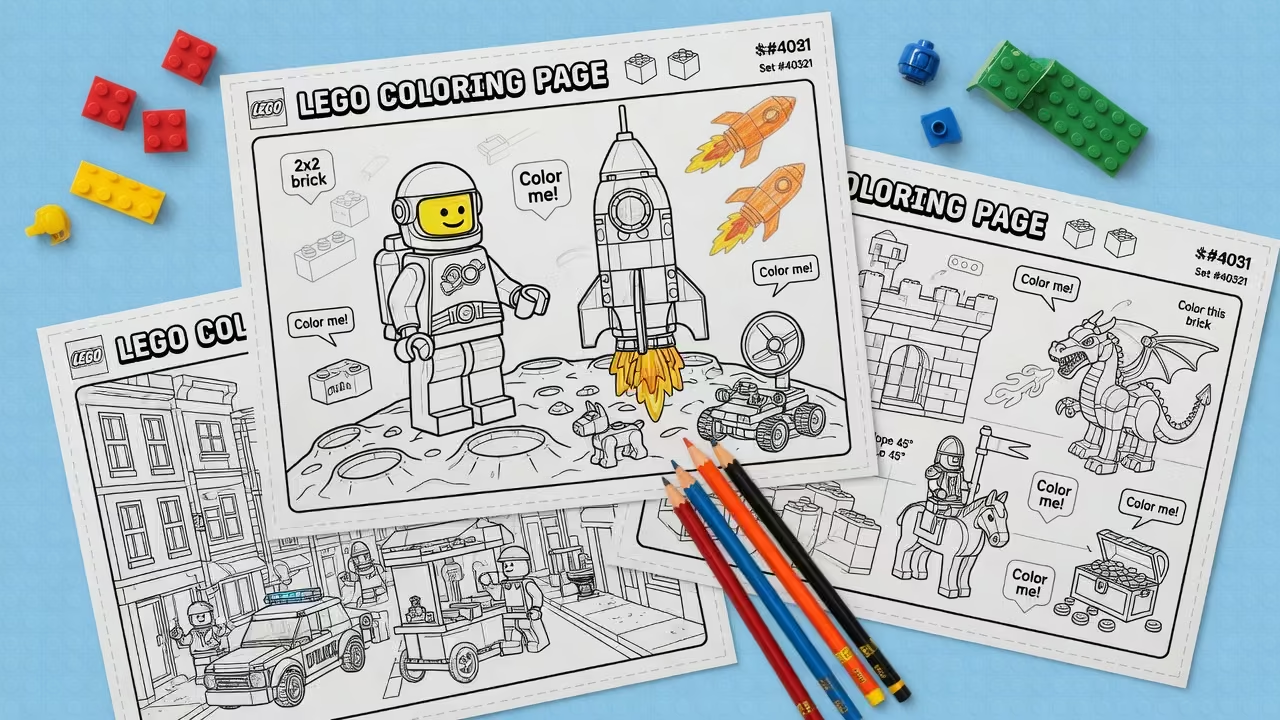
Why make your own LEGO coloring pages?
The biggest benefit of making your own LEGO coloring pages is customization. The page can match a child's real interests instead of forcing them into whatever happens to be available online.
- More personal: Generate LEGO city scenes, spaceships, fire trucks, dinosaurs, ninjas, castles, race cars, and more.
- More educational: Kids can color while noticing brick structures, color choices, focus, and creative details.
- Lower cost: Once generated, pages can be downloaded, saved, and printed again for home, classroom, or birthday activities.
- Faster workflow: Typing a prompt or uploading a photo in EasyColor is much quicker than drawing, searching, editing, and cleaning up images by hand.
If your child has just built something they are proud of, you can even turn it into a coloring page that feels like it belongs to them. That sense of ownership is hard to get from ordinary downloadable sheets.
3 ways to make LEGO coloring pages
| Method | Best for | Pros | Cons |
|---|---|---|---|
| Hand drawing | Parents or teachers who can draw | Full control and a handmade feel | Time-consuming, and line quality can vary |
| Traditional design software | Users familiar with Photoshop, Illustrator, or Canva | Good for layout and editing | Higher learning curve, and photo-to-line-art cleanup takes work |
| EasyColor AI | Parents, teachers, and content creators | Generates in seconds, supports text and photos, print-friendly | Works best when the theme and style are clearly described |
If your goal is to quickly create a printable LEGO-style page that kids actually want to color, EasyColor AI is the easiest place to start.
Recommended: generate LEGO coloring pages with EasyColor AI
EasyColor gives you two especially useful paths for LEGO coloring pages: text generation and photo generation. Text prompts are best when you want to start from an imagined theme. Photo conversion is best when you want to turn a real brick build into a coloring sheet.
Method 1: Text to Coloring Page
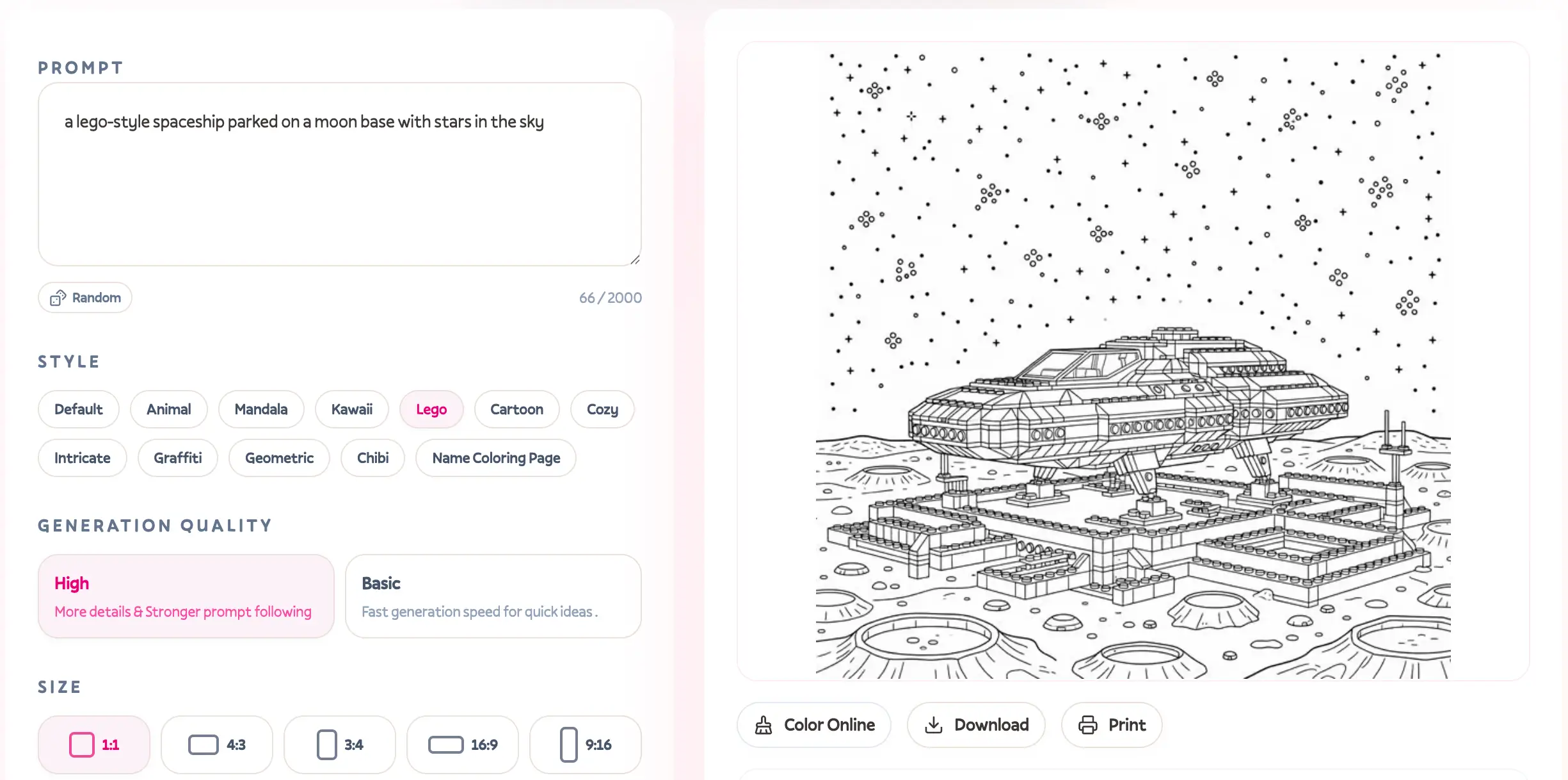
Open EasyColor Text to Coloring Page, then describe the LEGO-style page you want. A good prompt usually includes:
- Subject: for example, a LEGO fire truck, brick castle, or spaceship.
- Scene: for example, a city street, moon base, or beach hut.
- Style: choose the LEGO style provided in EasyColor.
- Difficulty: for example, more detail or simple for kids.
Copy-ready LEGO prompt examples
You can copy these prompts directly into EasyColor, or swap the subject words to create your own variations.
| Theme | Prompt |
|---|---|
| Spaceship | LEGO-style X-wing inspired space fighter, simple bold black outlines, kids coloring page, large white spaces, no color, no shadow |
| City fire truck | LEGO-style city fire truck with friendly firefighter minifigure, cartoon line art, black-and-white printable coloring page for ages 4-8 |
| Brick castle | LEGO-style brick castle with flags, simple stone blocks, clean coloring book line art, white background, easy to color |
| Dinosaur adventure | LEGO-style dinosaur adventure scene with explorer minifigure, bold outlines, playful kids coloring page, no shading |
| Race car | LEGO-style race car on a track, blocky toy design, clean black-and-white line art, printable coloring sheet |
| Ninja theme | LEGO-style ninja training in a small temple courtyard, simple cartoon line art, bold outlines, large open areas |
| Beach hut | LEGO-style beach hut with surfboard and small brick car, cheerful coloring page, clean outlines, white background |
| Technic robot | LEGO-style technic robot with gears and wheels, detailed but easy-to-color line art, printable black-and-white page |
| Birthday party | LEGO-style birthday party with cake, balloons, and blocky figures, simple kids coloring page, no color |
| Classroom | LEGO-style classroom scene with blocks, desk, books, and smiling minifigures, clean printable coloring page |
Small prompt tip: if the result is too complex, add "for preschool children, very simple shapes." If you want a bigger challenge for older kids, add "more detailed, for ages 7-12, but still clean printable outlines."
Prompt and style tips
When generating LEGO coloring pages, the goal is not to make the image look flashy. The goal is to make it printable and fun to color.
- Lines: Use bold outlines, clean line art, or thick black lines.
- Open spaces: Use large white spaces or open coloring areas.
- Background: Use white background or simple background.
- Avoid finished-image effects: Add no color, no shadow, no grayscale, or no dark background.
- Control difficulty: Use simple shapes for younger children and medium detail for ages 7-12.
You usually do not need to over-explain the black-and-white coloring page style, because EasyColor's model is already tuned for coloring page generation. Add extra style instructions only when the default result does not match what you need.
Method 2: Photo to Coloring Page
If your child has already built a LEGO creation such as a car, castle, robot, or space base, use EasyColor Photo to Coloring Page to turn the photo into a coloring page.
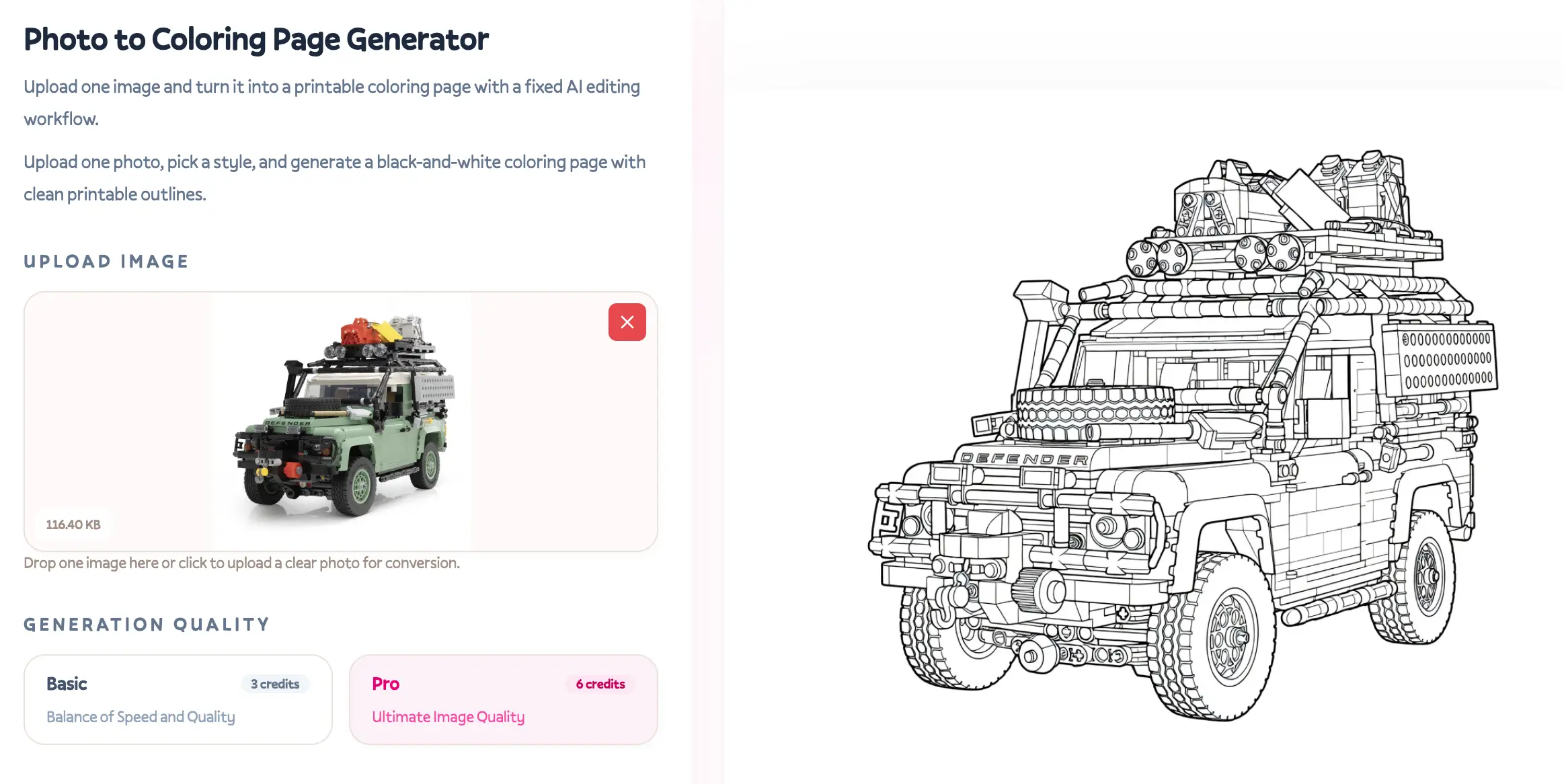
For better photo results, keep these tips in mind:
- Use enough light: Natural light works best, and strong shadows should be avoided.
- Keep the background clean: Use white paper, a tabletop, or a plain wall.
- Choose a clear angle: Let the main build fill most of the frame, and avoid angles that are too high or too tilted.
- Remove clutter: Keep extra toys, stationery, and hands out of the shot when possible.
- Capture the full shape: Do not crop off important parts such as wheels, towers, wings, or roofs.
This workflow is perfect for family activities: kids build the LEGO model, a parent takes a photo, EasyColor turns it into line art, and everyone prints and colors it together. It connects building and coloring into one complete creative activity.
If the photo background is messy or you want to remove it first, try the free EasyColor Remove Background tool before converting the image.
How to improve the generated page
After you get the first result, check it in this order:
- Is the subject clear? Can a child quickly tell whether it is a fire truck, castle, spaceship, or robot?
- Are the lines print-friendly? Are the outlines too thin, gray, or messy?
- Are the coloring areas large enough? Are there too many tiny marks that cannot really be colored?
- Is the background clean? Are there too many shadows, textures, or complicated scene elements?
- Is the difficulty age-appropriate? Ages 3-6 usually need simpler shapes, while ages 7-12 can handle more detail.
If the result is not right, do not switch tools immediately. A small prompt change often helps a lot. For example, change "detailed LEGO spaceship" to "simple LEGO-style spaceship coloring page for 5-year-old kids, bold outlines, large open spaces."
Advanced ideas for better LEGO coloring pages
Generate a themed mini collection
You can create 6-10 pages around one theme and turn them into a small printable pack. For example:
- LEGO city vehicles: police car, fire truck, ambulance, bus, construction truck.
- LEGO space exploration: rocket, moon rover, space station, astronaut, alien base.
- LEGO dinosaur park: T-rex, triceratops, dinosaur eggs, explorer vehicle, research camp.
- LEGO ninja training: dojo, weapon rack, rooftop jump, dragon, mysterious mountain gate.
Adjust prompts by age
| Age group | Prompt focus | Example words |
|---|---|---|
| Ages 3-6 | Big shapes, fewer details, thick lines | very simple, big shapes, thick outlines |
| Ages 7-12 | Medium detail and more scene elements | medium detail, fun scene, still easy to color |
| Family/classroom | Discussion and storytelling | storytelling scene, classroom activity, printable worksheet |
Add realistic brick-building details
To make the page feel more like a brick toy, try words like:
- blocky toy design
- brick-built shapes
- minifigure-style character
- studs on bricks
- simple plastic toy look
- modular building scene
Do not overload the prompt with too many objects. One clear main subject plus two or three supporting items usually works better than trying to include everything at once.
Example: from prompt to printable page
You can use this structure for your own blog post, social media example, classroom material, or printable pack.

| Example | Prompt | Best for |
|---|---|---|
| LEGO fire truck | LEGO-style city fire truck with firefighter minifigure, bold black outlines, kids coloring page, white background | Ages 4-8 family activity |
| LEGO moon base | LEGO-style moon base with rocket, astronaut, and rover, clean printable line art, medium detail | Space-themed classroom |
| LEGO dinosaur park | LEGO-style dinosaur park gate with explorer and friendly T-rex, simple coloring book page | Birthday party or dinosaur theme |
| LEGO robot | LEGO-style technic robot with wheels and gears, bold line art, no shading, printable coloring sheet | Ages 7-12 maker activity |
If possible, show three images together: the original LEGO build photo, the EasyColor black-and-white line art, and the finished page after the child colors it. That before-and-after view is very convincing.
FAQ
Can EasyColor-generated LEGO coloring pages be used commercially?
Commercial use depends on your use case, the generated content, and EasyColor's current terms. Home printing, classroom activities, and personal practice are usually simpler. If you plan to sell printables, create merchandise, or distribute pages at scale, review the site terms first and avoid protected characters, trademark logos, and official set names.
How do I make AI-generated lines more print-friendly?
Add "bold black outlines, clean line art, white background, no color, no shadow, large open spaces" to your prompt. If the result is still too complex, add "simple shapes for young kids."
What if I run out of free credits?
Start by making your prompt clearer so you need fewer retries. You can also browse Free Printable Coloring Pages for ideas, then use your favorite theme in Text to Coloring Page to create a custom version.
How is EasyColor different from Midjourney or DALL-E?
Midjourney and DALL-E are general AI image generators, so they often create images that look like finished illustrations. EasyColor is designed around the coloring page workflow: black-and-white line art, printability, colorable areas, text generation, photo-to-coloring-page conversion, and home or classroom use.
Is it okay to use official LEGO theme words?
For personal inspiration at home, you can describe the direction your child likes. For public publishing or commercial use, it is safer to use terms like "LEGO-style," "brick-building," "blocky toy," or "brick style," and avoid official characters, logos, and specific licensed set names.
Other tools can still help
Canva, hand drawing, and traditional image editors can all support coloring page creation, especially for layout, adding titles, and making collection covers. But when you want to turn one idea into printable line art quickly, EasyColor AI is the more direct workflow.
A practical process looks like this:
- Generate the LEGO-style coloring page with EasyColor.
- Download the high-resolution image.
- If you are making a collection, lay out the pages in Canva or a document editor.
- Print for kids to color, or save the pages in your own themed folder.
Create your first LEGO coloring page now
If you want to make a one-of-a-kind LEGO coloring page for your child, the fastest path is not searching for more generic downloads. It is telling EasyColor exactly what your child likes.
Open EasyColor Text to Coloring Page, copy one of the prompts above, change the theme, and generate your first custom LEGO-style coloring page. If your child has already built something, try Photo to Coloring Page and turn the real brick model into printable line art.
From one prompt to one printable page, it only takes a few minutes. Let your child choose the next theme.