
Yes, Nano Banana can make images that work as coloring pages, especially when you ask for clean black-and-white line art. But like most general image models, it is not automatically the same as a dedicated coloring page generator.
Nano Banana is useful when you want playful visual ideas, quick variations, or stylized concepts. If your goal is a page that prints cleanly for children, classrooms, gifts, or a coloring book, you still need to guide the model carefully and inspect the output before using it.
For a more direct workflow, EasyColor's AI coloring page generator is built specifically around printable line art.
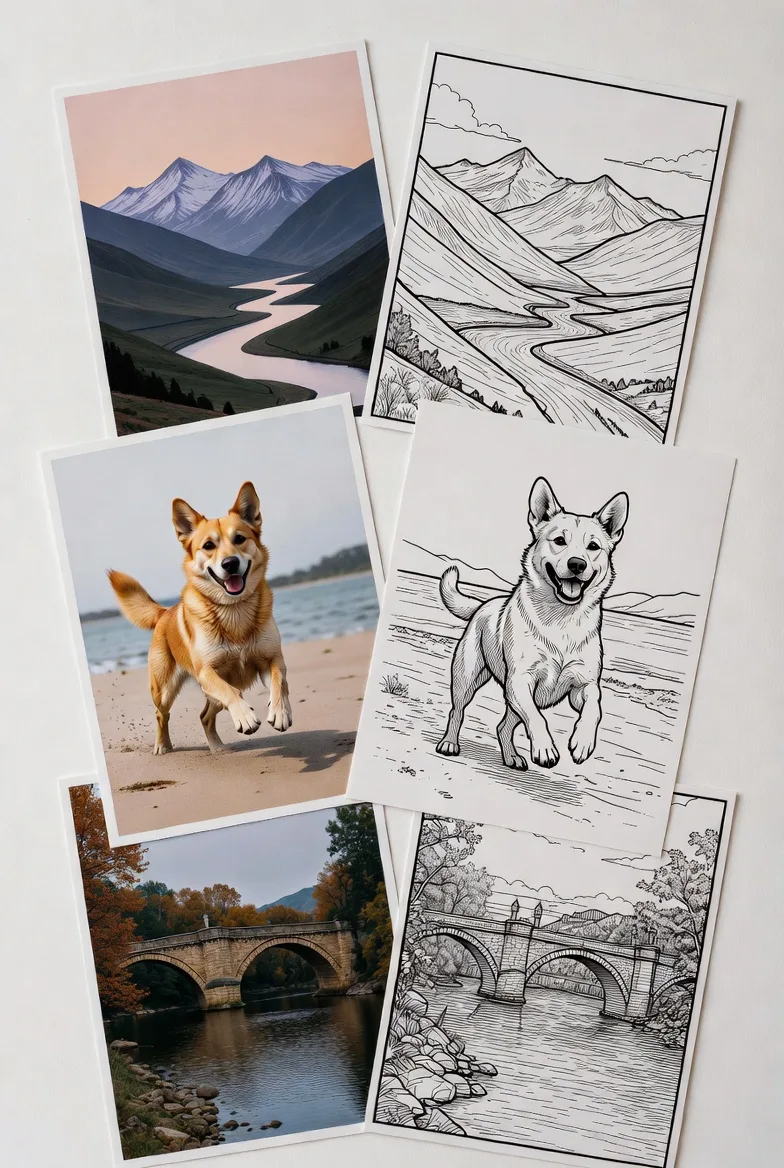
Quick answer
Nano Banana can create coloring pages from prompts, but the best results usually come from very explicit instructions:
- black-and-white line art
- bold clean outlines
- white background
- no shading
- no gray fill
- large open spaces
- printable coloring page
The model may still produce soft shading, sketch texture, extra decorative details, or composition choices that look nice on screen but feel crowded on paper.
Where Nano Banana is strong
Nano Banana can be helpful for imaginative page concepts. It tends to be useful when you want:
- cute character ideas
- playful scenes
- expressive animals
- quick prompt experiments
- stylized drafts
- mood and composition exploration
This makes it a good ideation tool. You can use it to discover what a page could look like, then simplify or regenerate the result for print.
If you need repeatable coloring sheets without manual cleanup, use EasyColor instead.
How to prompt Nano Banana for coloring pages
Use a prompt that tells the model both the subject and the output rules.
Prompt formula:
[subject and scene], simple black-and-white coloring page, bold clean outlines, white background, no shading, no color, large open areas, easy to print
Examples:
- "cute baby panda eating bamboo, simple black-and-white coloring page, bold outlines, white background, no shading, large open spaces"
- "friendly robot watering flowers, printable coloring page for kids, clean connected line art, no gray fill"
- "underwater castle with smiling fish, coloring book style, medium detail, white background, no shadows"
- "happy dinosaur birthday party, bold black outlines, simple shapes, printable coloring page"
If the output looks too illustrated, add "not a finished illustration" and "line art only."
Step-by-step workflow
Step 1: Start with a simple subject
Nano Banana can add a lot of charm, but crowded prompts often create crowded pages. Start with one main subject and two or three supporting details.
Better:
cute cat sleeping on a bookshelf, printable coloring page
Riskier:
cat, dog, dragon, castle, rainbow, garden, party table, fireworks, and city skyline
Step 2: Generate multiple versions
Do not stop at the first result. Generate a few options and choose the cleanest one. For coloring pages, the best image is not always the most impressive image. It is the one with the clearest outlines and most usable coloring spaces.
Step 3: Check the page like a printer would
Before downloading or printing, inspect:
- Are the outlines dark?
- Are the lines connected?
- Is the background white?
- Are there gray shaded areas?
- Is the detail age-appropriate?
- Can the subject be recognized quickly?
If the answer is no, simplify the prompt.
Step 4: Clean up if needed
Some Nano Banana outputs may need editing:
- remove gray background areas
- increase contrast
- erase accidental texture
- thicken weak outlines
- crop extra space
- simplify busy corners
If you do not want this manual step, generate directly with EasyColor's text to coloring page tool.
Common Nano Banana coloring page issues
Too much cute detail
The issue: the model may add tiny decorations, textures, or background objects.
The fix: ask for "simple shapes," "large open spaces," and "minimal background."
Soft sketch shading
The issue: the page may look like a pencil sketch instead of clean coloring line art.
The fix: use "no shading," "no hatching," "no gray fill," and "pure white background."
Finished-art composition
The issue: the image may feel complete already, with lighting and tonal detail.
The fix: add "line art only" and "designed for coloring, not finished art."
Uneven line weight
The issue: some lines may be bold while others are too faint.
The fix: ask for "consistent bold outlines" and test print before using the page.
Nano Banana vs EasyColor
| Feature | Nano Banana | EasyColor |
|---|---|---|
| Main use | general image creation and visual ideation | printable coloring page creation |
| Best strength | playful concepts and stylized variations | clean line art workflows |
| Prompting | needs strict constraints | built around coloring-page prompts |
| Cleanup | sometimes needed | usually less manual cleanup |
| Photo workflow | depends on the tool setup | photo to coloring page is built in |
| Best for | exploring visual ideas | printing, classrooms, gifts, and full coloring books |
Nano Banana can be a fun concept tool. EasyColor is the better fit when the final output needs to be a usable coloring page.
When Nano Banana is a good choice
Use Nano Banana when:
- you want fast visual ideas
- you are exploring character concepts
- you are comfortable regenerating several times
- you can edit the final image
- the page is for personal experimentation
Use EasyColor when:
- you need printable pages quickly
- you want consistent coloring-page output
- you are making classroom sheets
- you are building a coloring book
- you want to turn photos into line art
For full book planning, read how to create your own coloring book.
Prompt examples to try
- "cozy fox reading under a mushroom, black-and-white coloring page, bold clean outlines, white background, no shading, simple background"
- "cute astronaut floating near planets, printable line art for kids, connected outlines, large open spaces"
- "floral mandala with simple petals, black-and-white coloring page, symmetrical, no gray fill"
- "the name Leo in bubble letters with stars and rockets, bold outline coloring page, white background"
You can use the same prompt ideas inside EasyColor's AI coloring page generator.
FAQ
Can Nano Banana make printable coloring pages?
Yes, but review the output carefully. You may need to remove shading, simplify details, or strengthen outlines.
What prompt works best?
Use phrases like "black-and-white coloring page," "bold clean outlines," "white background," "no shading," and "large open spaces."
Is Nano Banana better than EasyColor?
Nano Banana is useful for image ideation. EasyColor is more focused on printable coloring pages.
Can I use Nano Banana for a full coloring book?
You can use it for drafts, but a full coloring book needs consistency, print testing, and quality control. See how to create your own coloring book.